
Introduction
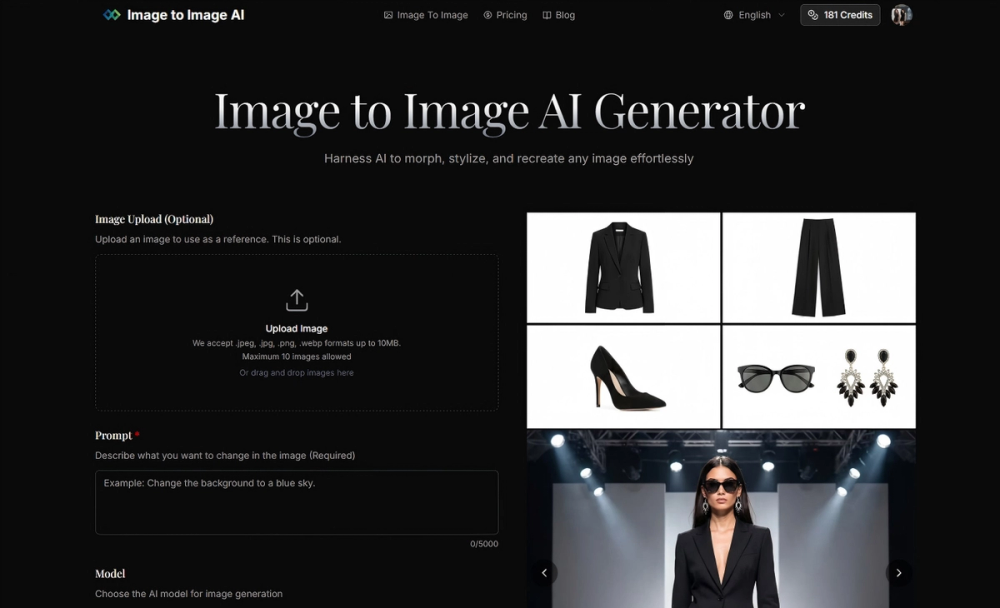
Image to Image AI is an online AI image transformation tool that lets users upload a reference image, describe the desired change in a text prompt, choose model and output settings, then generate downloadable image variations. The public site positions it for designers, marketers, creators, and casual users who want to restyle or reshape existing images without starting from a blank prompt. Its clearest value is controlled image-to-image editing: keeping parts of the original composition while exploring new styles, colors, environments, or campaign-ready variations.
Key Features
- Image upload supports
.jpeg,.jpg,.png, and.webpfiles up to 10MB, with a stated maximum of 10 images. - Prompt-based editing lets users describe what they want to change, with a visible prompt field that supports up to 5,000 characters.
- Model choices include Nano Banana, Nano Banana Pro, GPT-4o Image, and Flux Kontext, each using different credit amounts.
- Aspect ratio options include 1:1, 9:16, 16:9, 3:4, 4:3, 3:2, 2:3, 5:4, 4:5, 21:9, and auto.
- Output formats include PNG and JPG.
- The site highlights transformation workflows for maintaining original structure, generating multiple variations, applying artistic styles, and creating high-resolution images for marketing, product visualization, website content, or social media.
Use Cases
Image to Image AI is useful when the starting point matters. A designer can upload a concept image and ask for variations in a different style, color direction, or visual mood while trying to preserve the core structure. That makes it different from a pure text-to-image workflow, where the prompt has to recreate the scene from scratch.
Marketing teams may find it useful for exploring multiple versions of campaign assets, social visuals, product mockups, or website imagery. The public page specifically mentions campaign assets, product visualizations, website content, and social media campaigns, which suggests the tool is aimed at practical creative production rather than only experimentation.
Creative users can also use it for style transfer and visual exploration. The site mentions artistic styles such as oil paintings and cyberpunk aesthetics, as well as changes to colors, time of day, and surrounding environment. As with any AI image workflow, users should still review licensing, commercial-use terms, and output quality before using generated images in client work or public campaigns.
Pricing
Image to Image AI has a visible pricing page with subscriptions and credit-based usage. The page states that plans start from $12/month and explains that credits are used to access paid features. Visible model costs include Nano Banana at 3 credits, Nano Banana Pro at 6-12 credits, GPT-4o Image at 6 credits, and Flux Kontext at 4 credits. New users who log in for the first time receive 6 credits valid for one year. The pricing evidence also mentions yearly allocations such as 1,800 credits/year and 9,600 credits/year, plus credit packs whose credits do not expire. Monthly plan credits do not carry over to the next month, while annual credits remain valid throughout the annual subscription period.
User Experience and Support
The main workflow is straightforward: upload a photo, describe the change, adjust settings, then generate and download. The interface exposes the key controls directly on the page: image upload, prompt, model, aspect ratio, output format, and generation button. That makes the product approachable for users who know what they want visually but do not want to manage a more complex editing suite.
Support signals include a visible email address, support@imagetoimageai.live, a blog link, FAQ content, and pricing FAQ content. Plan evidence also mentions basic customer support on one plan and priority customer support on a higher plan. Users who need production support should verify response times and whether support covers prompt guidance, billing questions, failed generations, or only account issues.
Technical Details
The product works through an image-to-image generation flow: a reference image is optional, but the prompt is required. Users can choose from multiple AI models and output settings before generating images. The site says uploaded files can be JPEG, JPG, PNG, or WebP up to 10MB, and it lists a maximum of 10 images for upload.
The credit system is central to technical planning because different models consume different amounts. Nano Banana uses 3 credits per image, Flux Kontext uses 4 credits, GPT-4o Image uses 6 credits, and Nano Banana Pro is listed at 6-12 credits. No public API, integration system, batch automation, or team admin workflow is visible in the fetched evidence, so teams should verify those needs before adopting it for a larger production pipeline.
Pros and Cons
Pros
- Clear image-to-image workflow with upload, prompt, model choice, aspect ratio, output format, and download steps.
- Multiple model options let users trade off creative style, generation behavior, and credit cost.
- The pricing page explains credits, renewal timing, cancellation, and non-expiring credit packs.
- The tool supports common image formats and multiple aspect ratios for social, web, and campaign use.
- Commercial-use language is visible in plan details, which is useful for creators and marketers evaluating output rights.
Cons
- Credit consumption varies by model, so users need to understand usage patterns before choosing a plan.
- Monthly credits do not carry over, which may not suit users with irregular image-generation needs.
- The public evidence does not show an API, integrations, or team collaboration features.
- Output quality and prompt control still need direct user evaluation because AI image tools can vary by prompt, source image, and model.
- Users should verify commercial-use terms in the Terms of Service before using generated images in paid work.
FAQ
What is Image to Image AI used for?
Image to Image AI is used to transform existing images into new variations. Users can upload a reference image, describe the desired change, choose a model and output settings, then generate and download edited images.
How is image-to-image generation different from text-to-image generation?
Image-to-image generation starts with an existing visual reference, so the output can preserve more of the original composition or subject. Text-to-image generation starts mainly from a prompt, which can be less controlled when the original structure matters.
Which image formats does Image to Image AI support?
The public interface states that it accepts .jpeg, .jpg, .png, and .webp formats up to 10MB. It also says a maximum of 10 images can be uploaded.
What AI models are available?
The site lists Nano Banana, Nano Banana Pro, GPT-4o Image, and Flux Kontext. The pricing FAQ explains that these models consume different credit amounts, so users should compare model cost with expected usage.
Does Image to Image AI have a free option?
The site describes the tool as a free online photo editor and says new users who log in for the first time receive 6 credits valid for one year. Paid plans and credit packs are also available for heavier use.
Can generated images be used commercially?
The public page and pricing evidence mention commercial use of images in plan details and use cases such as marketing materials, product visualizations, website content, and social media campaigns. Users should still review the Terms of Service and Refund Policy before relying on generated images for commercial work.
How does the credit system work?
Credits are used to access paid image transformation features. Nano Banana is listed at 3 credits per image, Flux Kontext at 4 credits, GPT-4o Image at 6 credits, and Nano Banana Pro at 6-12 credits. Subscription credits renew by billing cycle, while credit-pack credits are described as permanently valid.
What should teams verify before using Image to Image AI in a workflow?
Teams should verify output rights, credit usage, cancellation terms, support expectations, prompt consistency, and whether the product offers the workflow features they need. The public evidence does not show API access, shared workspaces, approval tools, or integrations.
Conclusion
Image to Image AI is a focused tool for turning existing images into AI-generated variations with prompt control, model selection, aspect ratios, and downloadable PNG or JPG outputs. It is most compelling for creators and marketers who need fast visual exploration from a source image rather than fully open-ended generation. Before using it for ongoing production, readers should compare credit costs, model behavior, commercial-use terms, and support coverage against their actual image volume.