
Introduction
TikTok Comment Generator is a lightweight browser-based mockup tool built for creating TikTok-style comment visuals. The public site presents it as a free comment generator and comment maker that can create fake TikTok comments, reply mockups, and image exports without signup, which makes it most relevant for creators, marketers, or designers who need quick social-style visuals from the official site. The main thing to verify before relying on it is whether the generated mockups match your intended use, especially if you need accuracy, branding control, or commercial-safe output.
Key Features
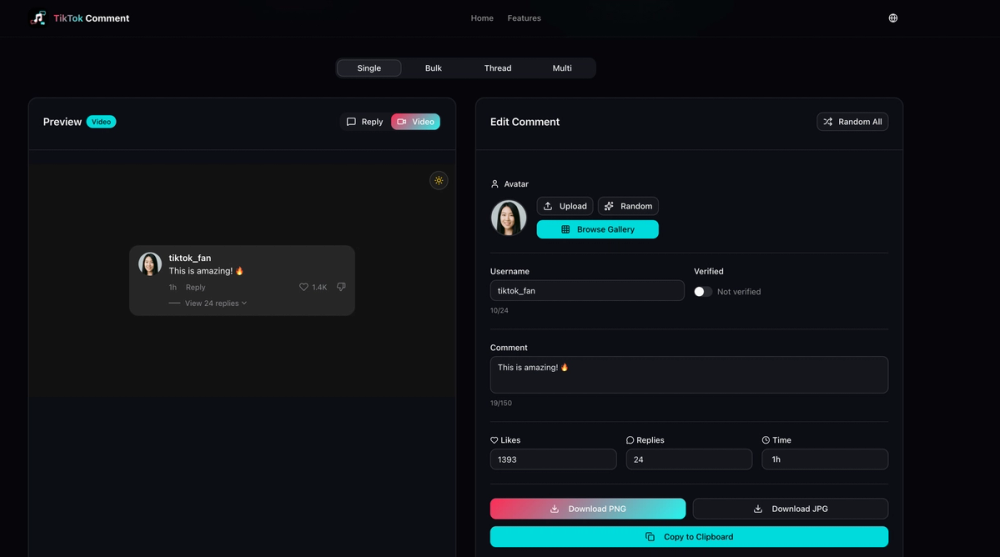
- Creates TikTok-style comment mockups.
- Supports reply mockups in addition to single comments.
- Allows custom avatar, username, likes, and timestamp fields.
- Offers comment templates for faster setup.
- Exports the finished mockup as an image.
- Does not require signup according to the public page copy.
Use Cases
The clearest use case is content mockup creation. Someone preparing a social media presentation, tutorial, thumbnail, or visual concept may want a TikTok-style comment image without needing to capture a real comment thread. The public copy makes this use case fairly clear because it emphasizes fake comments, templates, and image export rather than community interaction or analytics.
It also appears useful for marketing teams, meme creators, and designers who need fast comment-style assets for examples, demonstrations, or visual storytelling. Because the tool is positioned as a generator rather than a publishing platform, it looks better suited to mockup production than to live TikTok management.
A more cautious use case is educational or internal concept work. If you need editable-looking social proof examples for a deck, landing page concept, or training material, this kind of tool may save time. Even so, users should check output quality, image dimensions, and whether the mockups fit the exact style they need before adopting it in a repeatable workflow.
Pricing
The public page strongly signals that the tool is free. Both the page title and meta description describe it as "unlimited free" and "no signup," which lowers the barrier to trying it. What is not clear from the visible snapshot is whether there are hidden limits, premium upgrades, watermark rules, or usage restrictions, so readers should confirm those details during actual use.
User Experience and Support
The public positioning suggests a simple, low-friction experience: open the site, create a comment mockup, and export an image without account creation. That kind of flow is usually appealing for quick visual tasks, especially when users want a tool they can test immediately rather than configure over several steps.
Support, documentation, and help channels are not clearly visible in the available page evidence. If you plan to use the tool for recurring creative work, it would be sensible to verify whether there is any public guidance, troubleshooting information, or contact route in case export behavior or styling options are unclear.
Technical Details
The visible evidence supports a browser-based design tool identity, but not much more. The public copy confirms editable fields such as avatar, username, likes, and timestamp, plus image export, yet it does not clearly expose file formats, output resolution, browser compatibility, or any API or integration layer.
That means technical expectations should stay modest until verified. Users who need consistent export specs, automation, or integration with a larger design workflow should test the live product directly rather than assuming those capabilities are available.
Pros and Cons
Pros
- The product purpose is easy to understand from the public copy.
- Free access and no-signup positioning make it easy to try.
- The visible editable fields suggest useful control for fast mockup creation.
- Image export makes the output practical for presentations or content assets.
Cons
- The public snapshot does not clearly show support or documentation.
- Technical details such as format options and export quality are not publicly specific.
- The phrase "fake TikTok comments" means users should be thoughtful about context and intended use.
FAQ
What is TikTok Comment Generator used for?
It is presented as a tool for creating TikTok-style comment mockups, including fake comments and reply visuals that can be exported as images.
Who is TikTok Comment Generator best suited for?
The public positioning suggests it is most useful for creators, marketers, meme makers, and designers who need quick social-style visuals rather than a full social media management platform.
What can users customize in the mockup?
The visible copy mentions custom avatar, username, likes, and timestamp fields. It also refers to comment templates and reply mockups.
Does TikTok Comment Generator require an account?
The public page says there is no signup. That makes it easy to test, though users should still verify whether any usage limits appear during actual use.
Is TikTok Comment Generator free?
The visible site copy strongly suggests that it is free and even describes it as unlimited free. What the public snapshot does not clarify is whether there are any hidden caps, premium options, or export restrictions.
Can you export TikTok comment mockups as images?
Yes, the meta description explicitly says users can export as image. The page does not clearly specify format or resolution from the available evidence.
What should users verify before depending on this tool for regular work?
They should check output quality, styling flexibility, export details, and any terms around reuse, especially if the mockups will be used in client work, public campaigns, or commercial materials.
Conclusion
TikTok Comment Generator looks like a focused visual utility rather than a broad creator platform. Its strongest visible value is simple: fast TikTok-style comment mockups, free access, and no signup. For anyone interested, the next step is straightforward-try the live tool and confirm whether its export quality and customization options fit your actual content workflow.