
Introduction
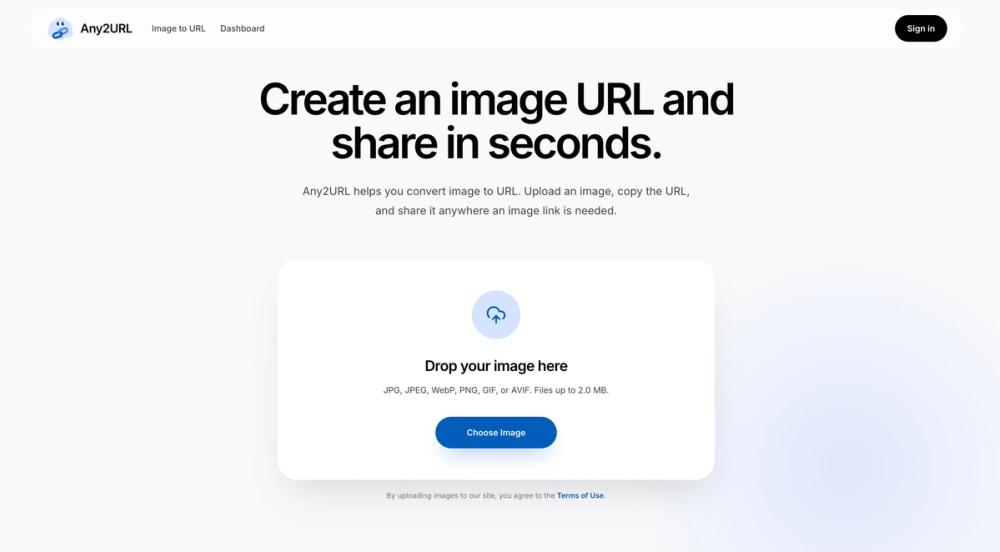
Any2URL is a simple online image hosting and sharing tool for turning local pictures into shareable URLs. The public page presents a straightforward workflow: upload a picture or photo, copy the generated link, and paste it anywhere a URL is required, such as a form, profile, message, post, ticket, or document.
The product appears best suited for everyday moments when attaching a file is inconvenient but a web address for an image is required. It is not positioned as a full media management suite; its clearest value is speed, simple sharing, and making local images usable in places that ask for a public image link.
Key Features
- Image-to-URL upload flow: Any2URL lets users choose a local image file, upload it, and receive a public URL that can be copied and shared.
- Support for common image formats: The page lists JPG, JPEG, WebP, PNG, GIF, and AVIF as supported formats.
- File-size guidance: The upload area states that files can be up to 2.0 MB, which gives users a clear practical limit before they try to upload.
- No account required before uploading: The visible FAQ says users can upload first and sign in later if they want to keep the file.
- Temporary and saved picture handling: Anonymous uploads are described as temporary and may expire after 24 hours, while signing in gives users a place to keep and manage image links that matter.
- Use-anywhere image links: The site highlights common destinations such as messages, forms, profiles, posts, tickets, notes, documents, and devices where opening a link is easier than moving a file.
Use Cases
Any2URL is useful when a website, form, profile, or support ticket asks for an image URL instead of a file attachment. In that situation, the user does not need to set up a larger hosting account or move the picture through email. They can upload the image, copy the link, and continue with the task.
The product also fits quick review and sharing scenarios. The page mentions product shots, sample photos, and listing images that need to be reviewed quickly, which suggests practical use for sellers, makers, support teams, or anyone who needs a lightweight way to make an image accessible through a link.
Another visible use case is moving a picture between devices. The site specifically notes opening the picture link on another device without emailing the file to yourself. That is a small but useful workflow for people who need a fast bridge between a phone, laptop, form, or chat.
Pricing
Any2URL says users can start for free and create image links without complicated setup. The public page also notes that free accounts include a limited amount of storage and upload capacity, while future paid plans can offer more space and higher limits for heavier use. It does not provide detailed plan names, exact storage quotas, paid pricing, or billing terms in the fetched evidence, so users with frequent or high-volume sharing needs should verify the current limits before relying on it.
User Experience and Support
The user experience is intentionally narrow: drop or choose an image, upload it, copy the image URL, and paste it where needed. The page repeatedly emphasizes speed and simplicity, which is appropriate for a tool that solves a small but common sharing problem.
Support details are not presented in depth on the fetched page. The page includes explanatory copy and FAQ-style answers about what Any2URL does, whether it is free, and whether an account is required before uploading. It does not clearly show dedicated help documentation, contact routes, or service-level support information, so users should verify those details if they plan to use it for business-critical image sharing.
Technical Details
The clearest technical details are the accepted image formats and the upload limit shown on the public page. Any2URL lists JPG, JPEG, WebP, PNG, GIF, and AVIF, with files up to 2.0 MB. It also describes anonymous uploads as temporary and says they may expire after 24 hours, while signed-in users can keep files as part of saved pictures.
The fetched evidence does not describe APIs, integrations, embed options, CDN behavior, access controls, image transformations, bulk upload, or privacy settings. Those omissions are important for technical users because a quick image URL tool may be enough for forms and messages, but not necessarily for application workflows, long-term asset hosting, or controlled media distribution.
Pros and Cons
Pros
- Very clear core workflow: upload an image, copy the URL, and share it.
- Supports several common image formats, including JPG, JPEG, WebP, PNG, GIF, and AVIF.
- Free access is visible, with no account required before the first upload.
- Useful for forms, profiles, tickets, posts, documents, chats, and device-to-device sharing.
- Signing in appears to add a way to keep and manage image links that matter.
Cons
- The public page shows a 2.0 MB file limit, which may be restrictive for high-resolution images.
- Anonymous uploads may expire after 24 hours, so they may not be suitable for permanent sharing.
- Detailed paid pricing, storage limits, and upload capacity are not clearly listed in the fetched evidence.
- Technical details such as APIs, access controls, and integrations are not visible.
- Users should verify privacy expectations before uploading images that are sensitive or not meant for broad access.
FAQ
What is Any2URL used for?
Any2URL is used to turn a local image into a shareable web link. The site describes it as a tool for uploading a picture, copying the generated URL, and pasting that link into websites, forms, messages, documents, social posts, profiles, or tickets.
Who is Any2URL best suited for?
It appears best suited for people who need a quick image URL without setting up a larger hosting workflow. That includes users filling out forms, sharing product photos, sending sample images, opening a picture on another device, or pasting an image link into a profile, message, or support ticket.
What image formats does Any2URL support?
The upload area lists JPG, JPEG, WebP, PNG, GIF, and AVIF. It also states that files can be up to 2.0 MB, so users with larger images may need to resize or compress them before uploading.
Do users need an account before uploading an image?
The public FAQ says users do not need an account before uploading. It also says anonymous uploads are temporary and may expire after 24 hours, while users can sign in later if they want to claim an upload and keep it as part of saved files.
Is Any2URL free to use?
The site says users can start for free and create image links without complicated setup. It also mentions limited storage and upload capacity for free accounts, with future paid plans potentially offering more space and higher limits.
What should users verify before using Any2URL for important images?
Users should verify storage limits, expiration rules, paid-plan availability, privacy expectations, and whether the generated links are appropriate for the intended audience. These details matter if the image needs to stay available beyond a quick share.
Can Any2URL replace a full image hosting or asset management system?
The public page positions Any2URL as a quick image-to-link tool, not as a full asset management platform. It may work well for simple sharing, but teams needing bulk management, access controls, analytics, or API workflows should confirm whether those capabilities exist before depending on it.
Conclusion
Any2URL focuses on one practical problem: making a local picture usable anywhere a web link is required. Its public page is clear about the basic workflow, supported image formats, free starting point, temporary anonymous uploads, and the value of signing in to keep important image links.
The product is most compelling for quick, lightweight sharing rather than complex media operations. Before using it for long-term or sensitive image hosting, readers should check the current storage limits, expiration rules, privacy expectations, and any available paid-plan details.