
Introduction
CostLoop is a subscription management app for small businesses, freelancers, startup teams, and individuals who need a clearer view of recurring software costs. The public site presents it as a manual, no-bank-connection tracker for subscriptions, licenses, renewal dates, invoices, cancellation links, and ownership details. Its strongest fit appears to be teams that are not ready for enterprise procurement software but still need more structure than a spreadsheet.
Key Features
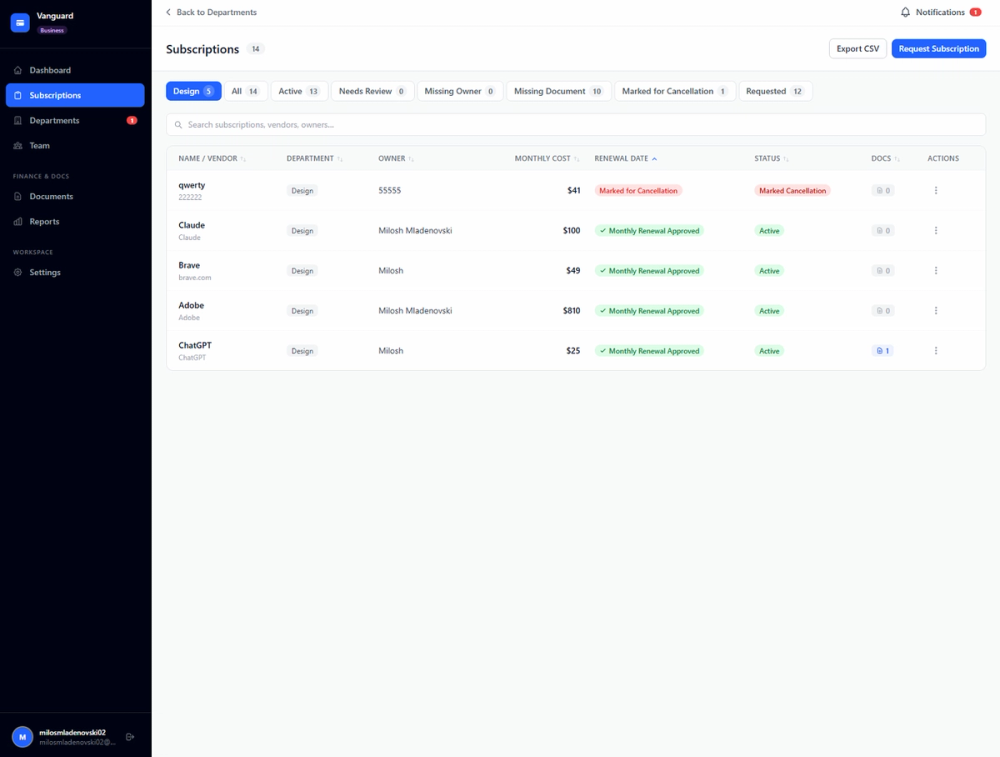
- Subscription tracking for recurring tools, including cost, billing cycle, status, category, renewal date, and owner.
- Renewal reminders with email alerts and configurable lead times such as 7, 14, or 30 days.
- Cost dashboards that show monthly spend, annual forecast, budget usage, and subscription categories.
- License and owner records for seat counts, assigned users, departments, and missing ownership signals.
- Document and link storage for invoices, contracts, receipts, vendor agreements, and cancellation URLs.
- Health score, unused seat detection, duplicate tool detection, savings opportunities, CSV import, and CSV export on supported plans.
Use Cases
CostLoop is most useful when a small business has accumulated tools across design, development, accounting, hosting, email, and project management without a central system for tracking renewals. The CostLoop homepage focuses on common problems such as forgotten auto-renewals, unused seats, scattered invoices, lost cancellation links, unclear ownership, and limited visibility into total spend.
For freelancers and solo operators, the product appears useful as a lightweight recurring-cost register. Instead of maintaining renewal dates and cancellation notes in a spreadsheet, a user can record subscriptions, attach invoice links, and review upcoming charges before they become surprises.
For startup teams or remote teams, the stronger use case is shared accountability. The site highlights workspaces, team members, approval flows, owner records, admin dashboards, and subscription requests on the Business plan, which suggests CostLoop can help teams decide who owns each tool and when a renewal needs attention.
Pricing
CostLoop publishes clear pricing on its pricing page. The Free plan is listed at $0 per month and allows users to test with 1 subscription, with no credit card needed. The Pro plan is listed at $9 per month for 1 user and unlocks unlimited subscriptions, health score features, savings opportunities, renewal calendar, CSV import and export, advanced reminders, bulk actions, and priority support. The Business plan is listed at $39 per month and adds workspace and team member features, subscription requests, approvals, instant email notifications to admins, a business panel view, and an admin-level dashboard. The page also mentions yearly billing with 2 months free, monthly cancellation for Pro, and plan changes from account settings.
User Experience and Support
CostLoop is positioned as simple by design: users manually add subscriptions rather than connecting a bank account, credit card, or complex integration stack. The site says setup can begin by entering recurring tools with fields such as name, cost, renewal date, owner, and notes, after which CostLoop calculates spend, renewal alerts, health score, and potential savings.
Support information is visible through the contact page, where the team says email is the best way to reach them and that they reply within 1 business day. The pricing page also lists email support and priority support by plan, while the site includes blog guides, account deletion guidance, privacy settings, and data export references.
Technical Details
CostLoop is a web-based subscription tracker with a manual-entry model. The site specifically says there are no bank integrations and no read access to financial accounts, which may appeal to users who want to avoid connecting sensitive financial sources. It also says there are no integrations to configure and no IT ticket needed.
Visible technical and operational signals include payments through Stripe, authentication and data storage through Supabase, email through Resend, CSV import and export, support for 10 currencies, and availability in English, Spanish, German, French, Norwegian, Swedish, and Danish. The site also states that users can export subscription data as CSV and delete their account from settings.
Pros and Cons
Pros
- Clear product focus: CostLoop does one specific job, tracking recurring subscriptions, licenses, documents, owners, and renewals.
- Manual setup avoids bank or card connections, which is useful for users who prefer direct control over what data enters the app.
- Pricing is visible, with a free entry point and published Pro and Business tiers.
- The feature set covers practical subscription-management details such as cancellation links, invoice records, owner fields, renewal calendars, and CSV portability.
- Team features on the Business plan make the product more relevant for growing teams than a personal-only tracker.
Cons
- Because CostLoop is manual, users need to enter and maintain subscription data themselves rather than relying on automatic bank feed discovery.
- Some advanced functions, including health score, savings opportunities, CSV import/export, and Business workspace features, depend on paid tiers.
- The product is not presented as a full accounting, ERP, or procurement platform, so teams with complex finance workflows should verify whether its focused scope is enough.
- Integration details are intentionally limited; buyers looking for deep vendor, accounting, or expense-platform integrations should confirm fit before adopting it.
FAQ
What is CostLoop used for?
CostLoop is used to track subscriptions, licenses, recurring software costs, renewal dates, cancellation links, invoices, contracts, and ownership details. The public site frames it as a cleaner alternative to spreadsheets for small businesses, freelancers, startups, remote teams, and individuals managing recurring costs.
Who is CostLoop best suited for?
CostLoop appears best suited for small businesses and freelancers that pay for multiple tools but do not need an enterprise procurement platform. It may also fit startup teams that want shared ownership records, renewal alerts, approval flows, and a clearer view of monthly and annual software spend.
Does CostLoop connect to bank accounts or credit cards?
No. The site states that CostLoop is fully manual and does not connect to bank accounts or read financial accounts. Users add subscriptions themselves, which keeps the workflow simple but also means the accuracy of the tracker depends on the data users enter.
What pricing plans does CostLoop show publicly?
CostLoop shows a Free plan for testing with 1 subscription, a Pro plan at $9 per month for 1 user, and a Business plan at $39 per month. The pricing page also mentions yearly billing with 2 months free and says Pro can be canceled from account settings with access continuing until the end of the billing period.
What subscription details can users track in CostLoop?
The features page says users can track subscription name, cost, billing cycle, category, status, renewal date, owner, department, seat counts, assigned users, notes, cancellation links, invoice URLs or PDFs, contracts, and vendor agreement information. CostLoop also highlights renewal reminders, calendar views, budget comparison, and savings signals.
How does CostLoop compare with a spreadsheet?
The site argues that a spreadsheet does not send renewal emails, calculate a health score, flag duplicate tools, detect unused seats, or store cancellation links and documents alongside each subscription record. That comparison is strongest for teams that have outgrown a static list but still want a simple manual system.
What should teams verify before relying on CostLoop?
Teams should confirm whether manual tracking fits their workflow, which paid plan includes the features they need, and whether CostLoop's focused subscription-management scope is enough for their finance process. Teams needing automated bank feeds, accounting sync, procurement workflows, or deep expense integrations should check the current product details before switching.
Conclusion
CostLoop gives small businesses and freelancers a focused way to organize recurring software costs without turning subscription tracking into an enterprise implementation. Its public pages are strongest on practical workflow details: renewal reminders, ownership records, cancellation links, document storage, health signals, pricing, and support routes. For users who want visibility without bank integrations, it is worth evaluating as a straightforward subscription tracker with clear plan boundaries.