
Introduction
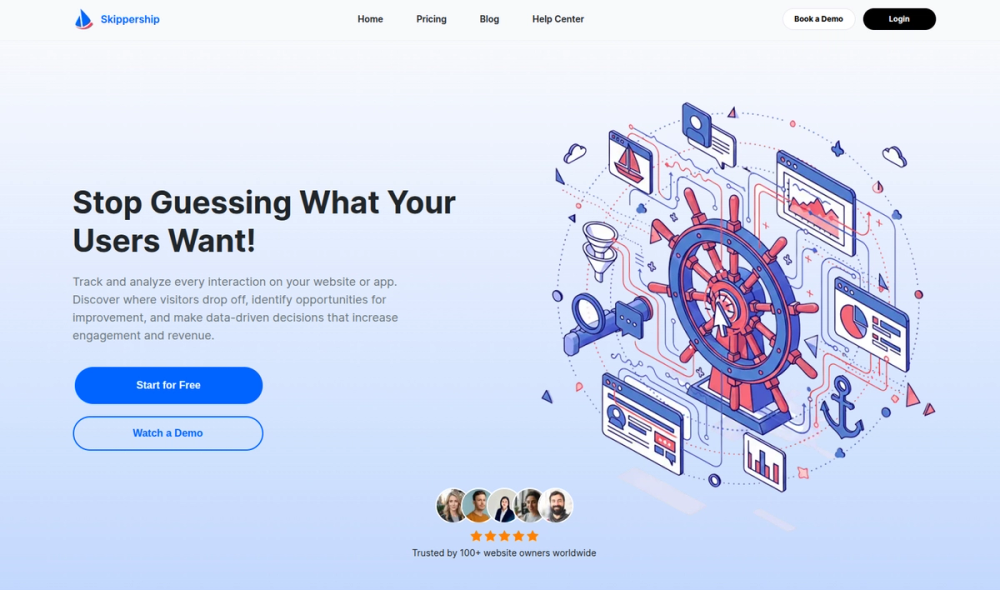
Skippership is an AI-assisted website and user behavior analytics platform for teams that want to understand how visitors move through a site or web app. The public site presents it as a way to track interactions, review session replays, study heatmaps, monitor goals, and identify drop-off points without a heavy technical setup. It appears most relevant for founders, marketers, product teams, ecommerce operators, and small teams that need clearer behavioral evidence before changing pages, funnels, or user flows.
Key Features
- Session replays show recorded user journeys, including clicks, scrolls, and interactions, so teams can inspect where visitors hesitate or abandon a flow.
- Heatmaps visualize clicks, taps, scrolling behavior, and attention patterns across pages.
- Goal tracking lets users monitor actions such as signups, purchases, and clicks.
- AI analytics are presented as a way to surface patterns, trends, and user behavior insights from collected data.
- The pricing page lists plan limits for monthly sessions, dynamic goals, dynamic heatmaps, data retention, websites, console errors or warnings, user journey discovery, auto data capture, user actions, and panel filters.
- Skippership highlights integrations with 50+ platforms, with visible examples including Google Analytics, WordPress, Shopify, Wix, Magento, Joomla, Squarespace, Drupal, WooCommerce, Jira, Weebly, BigCommerce, HubSpot, and ClickFunnels.
Use Cases
Skippership is useful for teams that need to diagnose why a page is not converting as expected. A product manager or marketer could use session replays to watch how visitors move through a checkout, signup, onboarding, or landing page flow, then compare those recordings with heatmap data to see whether important elements are being noticed.
For ecommerce and SaaS teams, the combination of goal tracking and user journey visibility can help connect page behavior with key actions such as purchases, signups, or button clicks. The practical value is not simply collecting more analytics data; it is seeing the moments where users slow down, miss a call to action, encounter friction, or leave before completing a goal.
Skippership may also fit smaller teams that want behavior analytics without building a custom tracking stack. The site describes a four-step setup: create a free account, add website details, copy and paste the Skippership script, and start tracking. A careful evaluator should still confirm how the tracking script behaves on their own site, how consent requirements are handled, and whether the plan limits match expected traffic volume.
Pricing
Skippership publishes a clear pricing page with monthly and yearly billing options, including a stated yearly discount. Visible plans include Free at $0 with 1,500 monthly sessions, 3 dynamic heatmaps, 5 dynamic goals, and 60 days of data retention; Starter at $27 with 5,000 sessions, 6 heatmaps, 10 goals, and 90 days of retention; Pro at $62 with 15,000 sessions, 10 heatmaps, 15 goals, and 180 days of retention; and Elite at $160 with 50,000 sessions, unlimited heatmaps, unlimited goals, and 365 days of retention. All listed plans show unlimited websites, unlimited console errors or warnings, user journey discovery, auto data capture, user actions, and panel filters, though buyers should confirm current pricing and plan rules before subscribing.
User Experience and Support
The public page emphasizes a simple, no-code setup and a dashboard designed to make session replay, heatmaps, goal tracking, and AI analytics easier to understand. The clearest user-experience promise is that teams can add a lightweight script to a website header and begin capturing user interactions without a long implementation process.
Support signals are visible through a Help Center link, a Book a Demo option, FAQ content, and the statement that users can contact support by chat or email. The site also says detailed setup instructions are available in the dashboard. For teams with stricter onboarding requirements, it would be sensible to review the help materials directly and confirm response times, support availability, and implementation guidance for their specific platform.
Technical Details
Skippership works through a website tracking script that users add to the site header. The FAQ describes the script as lightweight and says it is intended to avoid affecting load times or user experience. The platform records full user sessions and allows users to pause or disable session replays from the dashboard.
The site also presents privacy and data-handling features, including automatic masking of sensitive information such as passwords, credit card details, and text inputs. It states that Skippership follows GDPR and CCPA standards, provides tools for data masking, user consent, and data deletion upon request, and stores data on AWS servers. Teams with legal, compliance, or procurement requirements should verify the full terms, data processing details, and consent implementation before relying on those claims in production.
Pros and Cons
Pros
- Combines session replays, heatmaps, goal tracking, and AI analytics in one behavior analytics workflow.
- Pricing and plan limits are visible, which makes early evaluation easier.
- The setup path appears accessible for non-technical users because it relies on adding a tracking script rather than custom development.
- Integration signals are strong, with 50+ platforms mentioned and several common CMS, ecommerce, and workflow tools listed.
- Privacy-related controls such as sensitive-field masking, consent tools, data deletion, and replay pausing are described publicly.
Cons
- Teams still need to validate how the tracking script performs on their own site, especially if they have strict performance budgets.
- The public page provides plan limits but does not fully explain every operational boundary, such as overage handling or enterprise procurement details.
- Session replay and heatmap tools require careful consent and data governance, so implementation should be reviewed before production use.
- Reporting depth may need closer evaluation if a team depends on advanced dashboards or custom analysis workflows.
- AI-generated insights can be useful for triage, but teams should treat them as decision support rather than a substitute for product judgment.
FAQ
What is Skippership used for?
Skippership is used to analyze how visitors interact with a website or web app. The site highlights session replays, heatmaps, goal tracking, and AI analytics as ways to find friction points, understand user journeys, and identify where visitors drop off.
Who is Skippership best suited for?
Skippership appears best suited for website owners, SaaS teams, ecommerce operators, product managers, marketers, and founders who need practical behavior analytics without building a custom analytics system. Its published plans also suggest it can support small projects through larger traffic needs.
What can users clearly verify from the public site?
Users can verify the core feature set, plan pricing, session limits, heatmap and goal limits, data retention windows, setup steps, support routes, and several integration examples. The public site also explains how installation works and describes sensitive-data masking and replay controls.
How does Skippership help with conversion analysis?
Skippership helps teams inspect user behavior around important actions such as signups, purchases, clicks, and page interactions. Session replays can show where a visitor hesitates, while heatmaps can reveal which page areas receive attention or get ignored. Those signals can guide page changes, but teams should validate results with their own analytics and experiments.
Does Skippership show pricing publicly?
Yes. Skippership lists Free, Starter, Pro, and Elite plans with published monthly prices and usage limits. The page also shows a yearly billing option with a stated discount, so buyers can compare plan fit before creating an account.
What integrations does Skippership mention?
The public page says Skippership integrates with 50+ platforms. Visible examples include Google Analytics, WordPress, Shopify, Wix, PrestaShop, Magento, Joomla, Squarespace, Drupal, WooCommerce, Jira, Weebly, BigCommerce, HubSpot, and ClickFunnels.
What should teams check before installing Skippership?
Teams should confirm consent requirements, data masking behavior, retention settings, script performance, and whether their plan includes enough sessions, heatmaps, and goals. Sites that handle sensitive data should also review Skippership's privacy policy, terms, and any data processing requirements before deployment.
Can Skippership record sensitive information?
The site says Skippership automatically masks sensitive information by default, including passwords, credit card details, and text inputs. That is an important public claim, but teams should still test their own forms and privacy configuration before collecting production sessions.
Conclusion
Skippership presents a focused behavior analytics platform for teams that want to see what users actually do on a website, not just count pageviews. Its strongest public signals are session replays, heatmaps, goal tracking, AI-assisted insights, visible pricing, and a straightforward script-based setup. For teams evaluating it, the next step is to compare plan limits with expected traffic and confirm privacy, consent, and performance requirements on their own site.